How do I setup Mac Mail to access my mailbox?
Print
Created by: Ben Robinson
Modified on: Wed, 31 Jul, 2019 at 9:14 PM
To setup a mailbox using IMAP within MacMail please follow the instructions below, the details to use for your mailbox can be found here.
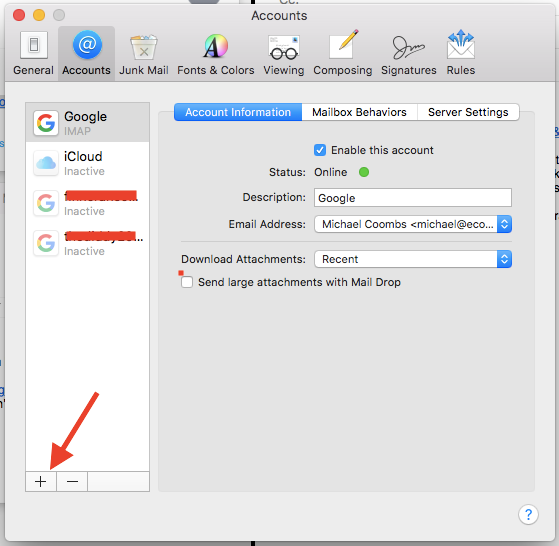
- Open MacMail and select Mail > Preferences from the menu bar.
- Select the Accounts tab and then click the '+' button on the bottom left of the window.
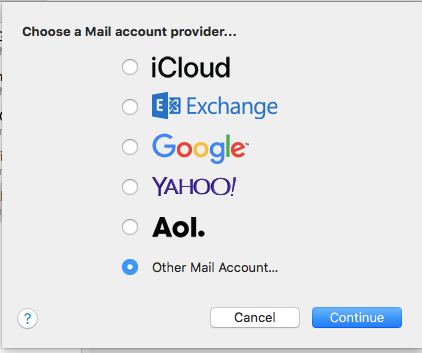
- When prompted to Choose a Mail account provider... select Other Mail Account...
- From the Add Account screen you can then enter the mailbox details and click Sign in:

- Full Name: <name you want to give the mailbox>;
- Email Address: <email address>
- Password: <mailbox password>
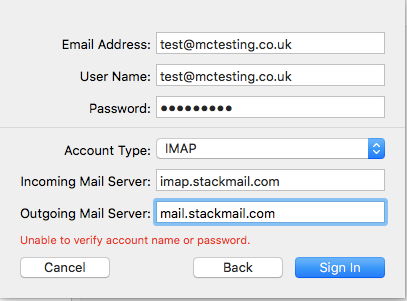
- You'll then be prompted to add the username, mailbox type and server details, once added click Sign in
- MacMail will prompt you to choose which apps you want to use (Notes/Mail) and then detect the settings from the stackmail servers and your mailbox will be setup.
Ben is the author of this solution article.
Did you find it helpful?
Yes
No
Send feedback Sorry we couldn't be helpful. Help us improve this article with your feedback.
